Showing posts with label assistive_technology. Show all posts

Monday, August 8, 2016

Rewordify- a Whiz-Bang technology tool you must have!


I’ve been using Rewordify with my students for the past 4 years in my job as a high school resource room teacher. I try and use tech tools that can help level the playing field for challenged learners. It is overwhelming when I am trying to differentiate reading material because there are just so many words that I have to address in each passage.

I found rewordify at rewordify.com . It is FREE! It is available to all my students. It is easy to use for them and easy for them to bookmark and use independently! It is a tech tool that once it has been introduced to a student, it is one thing they remember to ask for and use.
Basically, Rewordify takes a passage, an article, a webpage or a book and can sift through the vocabulary and whiz-bang produce a passage with understandable vocabulary with the same meaning.


Here is a passage I entered into the home page from a NOAA website.
Rewordified:
An river is the thin zone along a (land next to a body of water) (such as bays, lagoons, sounds orsheds (skin, etc.)) where freshwater systems and rivers meet, and mix with a salty ocean,becoming partly salty.
Sometimes, freshwater from rivers mixes with large freshwater bodies creating a "freshwaterriver" that functions like a typical partly salty rivers.
The five major types of rivers are coastal plain, bar-built, delta system, (related to Earth's surface plate movement), and fjords.
Rivers are (like nothing else in the world) places that are valuable to (the health of the Earth/the surrounding conditions) and to (community of people/all good people in the world).


Original passage:
An estuary is the thin zone along a coastline (such as bays, lagoons, sounds or sloughs) where freshwater systems and rivers meet, and mix with a salty ocean, becoming brackish.
Sometimes, freshwater from rivers mixes with large freshwater bodies creating a "freshwater estuary" that functions like a typical brackish estuaries.
The five major types of estuaries are coastal plain, bar-built, delta system, tectonic, and fjords.
Estuaries are unique places that are valuable to the environment and to society.   


But that is not all! There are features that extend the learning beyond the passage!
I can get a read out of the statistics about words per sentence, letters per word, and much more.This image shows some of the great features. My favorites are the rewordified text, Cloze activity and the answer key! Use this link for a larger clearer image.
Rewordify.com   Understand what you read.png

This next image is a shout out to my ELL friends and speech and language therapists! The color coded passage with all the parts of speech is such a bonus! Larger image.
Rewordify.com  2.png
Go to Rewordify.com!  Make your own FREE account. Begin differentiating immediately. You have time, the school year is just beginning!      Check back for my next post about Educator Central a part of the Rewordify page.

You are probably wondering who made this site and who supports it. I didn't have to look far to find out about Neil M. Goldman. Here is the scoop! Thanks, Mr. Goldman, this is a treasure. I am glad you found a way to help challenged learners.

Biography from Amazon

Neil M. Goldman spent fifteen years as a cubicle-bound computer professional and decided that he wanted to do more meaningful work than sit in front of a screen and write for-next loops.


So, he said a hearty goodbye to his marginally competent managers and a warm hello to the learning-hungry students in a suburban high school English classroom.

That first year of teaching was the hardest, most rewarding year of his life, and he felt he had to write about it. His first nonfiction book, Never Too Old To Teach, chronicled the joys and frustrations of that first year as a teacher.

Electric Dawn, his first novel, explores a scenario that's been on his mind for many years: what would happen if someone made a miraculous discovery of a device that would change the way the world works? Would that person be embraced and celebrated, or surrounded and destroyed?

When he's not writing books and grading papers, Neil enjoys motorcycling, cooking, and travel.

Thursday, July 3, 2014

Summah Learning Time

Just learning about Booktrack Classroom from my friend Vicki Davis, who went to ISTE14. Thanks Vicki! Booktrack Classroom features:

  • Free for teachers
  • Increased reading comprehension for students
  • Increased motivation to engage in the writing process
  • Publish for your classroom
  • Set up for a small classroom takes less than 10 min.
  • FUN! I wrote and published a nonfiction story , 2 chapters, in 10 minutes complete with sound tracks!
  • Great for grades k-12.
  • Good selection of classics already available!


Tuesday, May 10, 2011

Special Needs Students using Collaborative Google Apps

cross-posted at techlearning.com


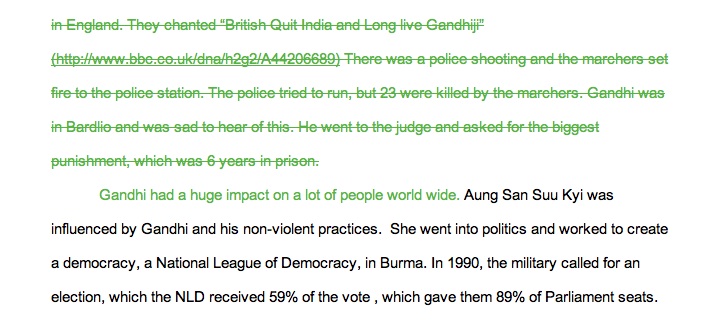
Recently, I was asked about how I was using Google apps with students who have special needs. I thought about it and decided to document what I have seen this year.(Shout out to Penny in Australia, for her question.)  I am teaching in a high school, using google apps with students who have  a difficult time completing classroom assignments, organizational challenges and missing paper syndrome.

By using Google docs, spreadsheets and presentation applications,  my students always have evidence that they have turned in their work because they can always share the items with their teachers. This may not seem like a huge learning expectation, but I can tell you that at least 50% of student worksheets are completed, yet they find their way to the bottom of the backpack and, without an adult intervening, the work is not turned in and graded. (Note to self and others, put your work assignments in a collaborative google document and your students are more likely to complete and turn them in for grading.)

The best part about using Google apps with special needs students, for me, has to be collaborative editing of student work. When a student  gets an assignment, the first thing that happens is that the student begins the document, presentation or spreadsheet and immediately shares the work with a teacher. Within moments of receiving the email notification for the shared item, I reply to the student and begin my coaching. I like to comment on the title, the thesis or question that the students start with, I ask about the due date, the rubric and then begin breaking the assignment down, differentiating for each student.

I like using the revision history and sharing this option with the student. This is where we have a discussion about work expectations and the ability to see how much time the student has put into the work. This is going to be an important part of work and employment accountability in the future and thus a life long skill.

So far, the information I have shared could be used with all students. However, the editing part of google apps is the best and most meaningful part for special needs learners. When students share their document with a teacher, the editing part can become a very creative and meaningful process. Often I use the insert menu and the drop down comment tool.This allows me to leave a place mark in the body of the document, while leaving an entire comment off to the side of the document. Using this process I can leave suggestions, comments, and notes for the student to improve the existing paper. The student then has the option to reply to me in the comments, or to delete the comment when the “fix” has been completed. I  use the insert comment, I can  highlight, change the color of text and otherwise be creative with edits and suggestions. No longer do the edited comments need to stay in the red mode. I can use colors, fonts, bold, italics and more to set the text aside for instructional purposes. The best part, none of my students have reacted badly  to the edits in their work. It almost seems like with  the comments as part of the documents, the student focuses more on fixing the edits as a next step in the process, rather than an attack on their ego, their writing or their learning, or even that this is additional work when addressing the ‘fixes’.

Often, I will sit side by side with the student as they work. We are logged into two different computers,  and both have the document or presentation up on our screens. We can be working on different parts of the assignment.This helps to demonstrate that we can work together in the same room or miles apart. As soon as an edit is posted, the student gets to work and I keep processing the rest of the paper. I have edited with students in the same room, same building, same town and even miles away when I went to a conference and the student was back at school. An added advantage is that I am able to edit any time or place when my students use google apps and the sharing tools. We don’t have to wait until the next day when the student is available to come work during support study.

Finally,  working with google apps is an efficient way to collaborate with all students, the benefits of doing this work with challenged learners is that the coaching and support happens without the judging that some students feel when working face to face with their teachers on their written assignments. Below is an example of an edited assignment recently turned in for World Studies.

I know this is an effective way to work with students since a few of my students open a document and begin sharing before they begin writing. Here are some important steps I follow.
  • Start with a school google account for teachers and students.
  • Give assignments in shared google docs, presentations or spreadsheets.
  • Begin coaching during the editing process of the assignments.
  • Always leave instructional comments for the students to act on.
  • Always leave comments about parts of the assignment that you like.
  • Be the cheerleader! Cheer that student on towards success!


Share your successes here in the comments!

Tuesday, November 4, 2008

WritingTools4All, Presentation from ACTEM08

Presentation Writingtools4all

This is where you can follow the presentation by Beth Goodwin and Cheryl Oakes. You can listen to the audio and follow along with the website. Thanks to all the great participants. Thanks to Beth's students for giving us the photos and good information to share.
http://writingtools4all.pbwiki.com